EcuLab
KTAG V7.020
KTAG V7.020
Couldn't load pickup availability
Note
First and foremost
- If you have any questions or encounter a problem, please contact us first. We will provide technical assistance.
- Please do not leave negative feedback without contacting us first.
Software Downloads
If the provided CD is damaged or unusable during transport, you can download the files here:
KESS Software
https://mega.nz/file/SRhWxYoC#-2Yjk8IuMV74tqhR39JaJAmUIWiF11HcfOXlKYxCV0E
KTAG Software
https://mega.nz/folder/OcR2TI7B#BMuhxwYaKsmjqvmRPhkP_g
Installation Video
https://mega.nz/file/jcxihBCI#tSPpB1w9jClYwkN8B_DZ4iA1rZUtKE3adMxZutA8HVw
Important
Before downloading or installing the software:
- Temporarily disable your antivirus.
- Disable Windows Defender or any other real-time protection.
Otherwise, some files may be automatically deleted.
Differences between KESS and KTAG
KESS V5.017
For most vehicles, KESS allows reading and writing to the ECU directly via the OBD2 port, without disassembling the ECU.
Its use is simple and fast.
KTAG V7.020
KTAG mainly operates in:
- Boot
- BDM
- Tricore
- GPT
The ECU generally needs to be removed from the vehicle.
The software indicates the step-by-step method to follow depending on the ECU.
Vehicle Compatibility
KESS V5.017
Does not support Toyota Denso 76F00XX ECUs.
KTAG V7.020
Compatible with Toyota Denso 76F00XX ECUs.
Heavy Vehicles
KESS supports some:
- trucks
- tractors
- motorcycles
KTAG offers much broader compatibility with:
- trucks
- tractors
- motorcycles
- diesel engines
- some boats
Software Versions
KESS V5.017
Available versions:
- V2.80
- V2.70
- V2.53
KTAG V7.020
Available version:
- V2.25
KESS V5.017 Highlights
- Internet connection allowed (Online version).
- Unlimited use (no token system).
- Compatible with cars, trucks, tractors, and motorcycles.
- Operates on 12V and 24V.
- Available languages:
- French
- English
- German
- Spanish
- Italian
- Portuguese
- Compatible with Windows XP, 7, 8, 10…
- More than 140 protocols supported.
- Compatibility:
- K-Line
- CAN
- EDC17
- MED17
- J1850
- etc.
- Read and write via OBD2 for most vehicles.
- For some ECUs, Tricore mode is necessary (ECU to be disassembled).
KTAG V7.020 Highlights
- Online Version.
- Unlimited token usage.
- Compatible:
- cars
- trucks
- tractors
- motorcycles
- boats
- 12V and 24V compatible.
- Multilingual interface.
- Compatible with Windows XP, 7, 8, and 10.
- More than 160 protocols available.
- Read and write via:
- Boot Mode
- Tricore
- BDM
- GPT
The ECU generally needs to be opened.
Integrated KESS Functions
The software notably features:
- Real-time battery voltage monitoring.
- Recovery function in case of flash failure.
- Automatic checksum correction (when available).
- Full compatibility with ECM Titanium.
- Programming counter management.
- ScanTool function for clearing diagnostic trouble codes (DTCs).
- Multiple read/write speeds.
- Full map writing.
- Bootloader mode support.
Box Contents
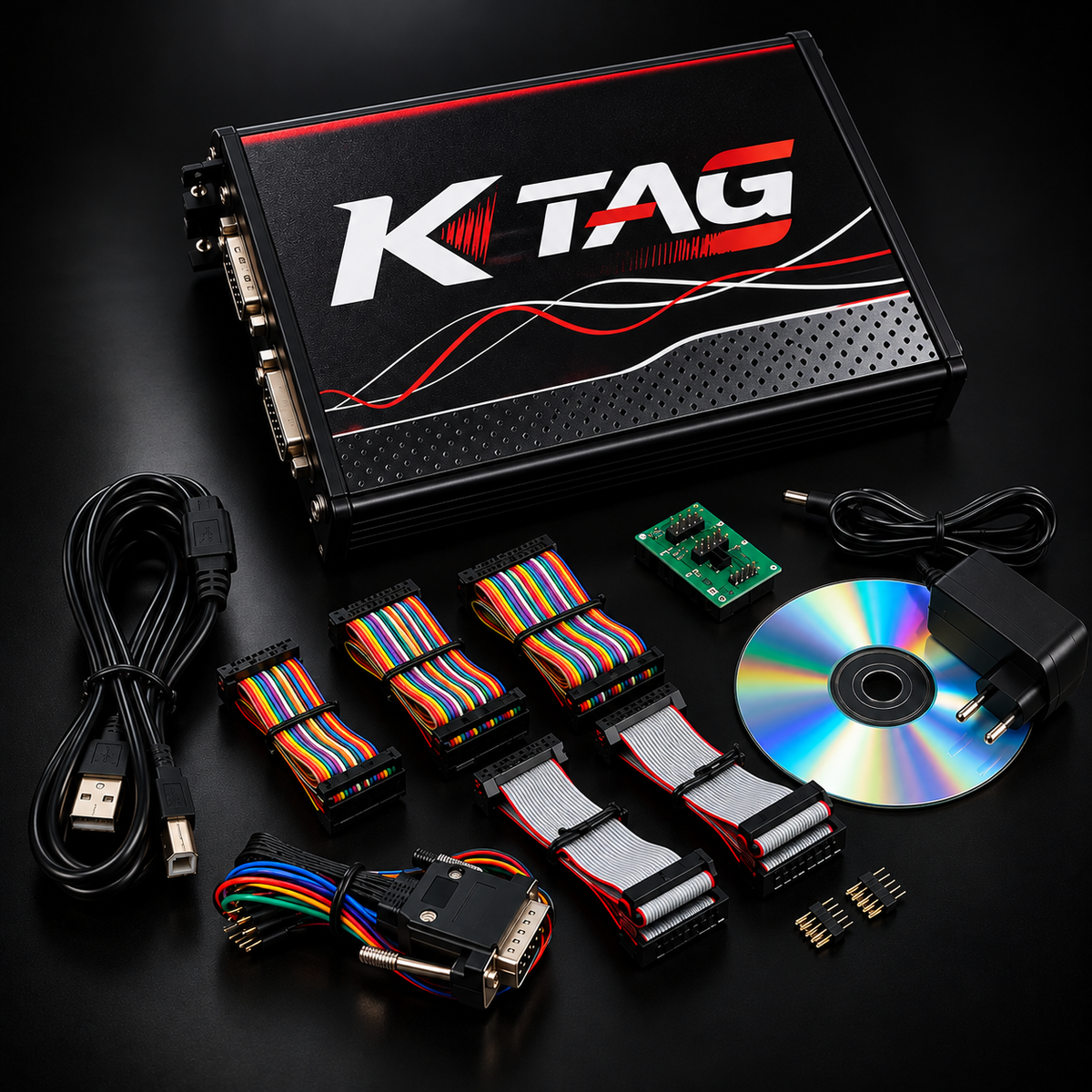
KTAG V7.020 Box
- Main unit
- GPT cable
- 144300T adapters:
- 100
- 101
- 102
- 103
- 104
- 105
- 106
- 3 internal chips
- Multi-colored harness
- USB cable
- 12V power supply
- Installation CD
KESS V5.017 Box
- Main unit
- Tricore module
- Tricore cable
- OBD2 cable
- 144300KCAN adapter
- K4 cable
- 14P600KCK4 adapter
- Universal cable
- 144300K201 adapter
- USB cable
- Installation CD
Frequently Asked Questions (FAQ)
Why does my 4GB SD card only show 120MB?
The SD card is an encrypted card.
Most of its content is hidden and protected.
It is therefore perfectly normal for Windows to only show about 120MB.
No data is missing.
Message: “Connection not established”
Check that the KESS drivers are correctly installed.
To do this:
- open Windows' Device Manager;
- verify that the interface is recognized.
Message: “Checksum Error”
Two solutions:
Solution 1
Install Microsoft Visual C++ libraries:
- 2005
- 2008
- 2010
Then restart the software.
Solution 2
Contact the seller to obtain the latest DLL files to replace in the installation folder.
“Wake Up Error”
Possible causes are:
- wrong vehicle type selected (e.g., Diesel instead of Gasoline);
- incorrect ECU power supply;
- incorrect ECU connection.
Also try to:
- completely reinstall the software;
- replace the SD card if the problem persists.
“External Exception EEFFACE” Error
This error usually appears when:
- you are using other software with this hardware;
- you are using this software with another unit.
To resolve the issue:
- Completely uninstall the software.
- Delete all old files.
- Reinstall the program directly into:
C:\- Then restart the software.
This version is smoother, more professional, and adapted for a French manual, while retaining all the technical information from the original document.
Partager